
Best Affordable POS Systems for Dine-In Restaurants
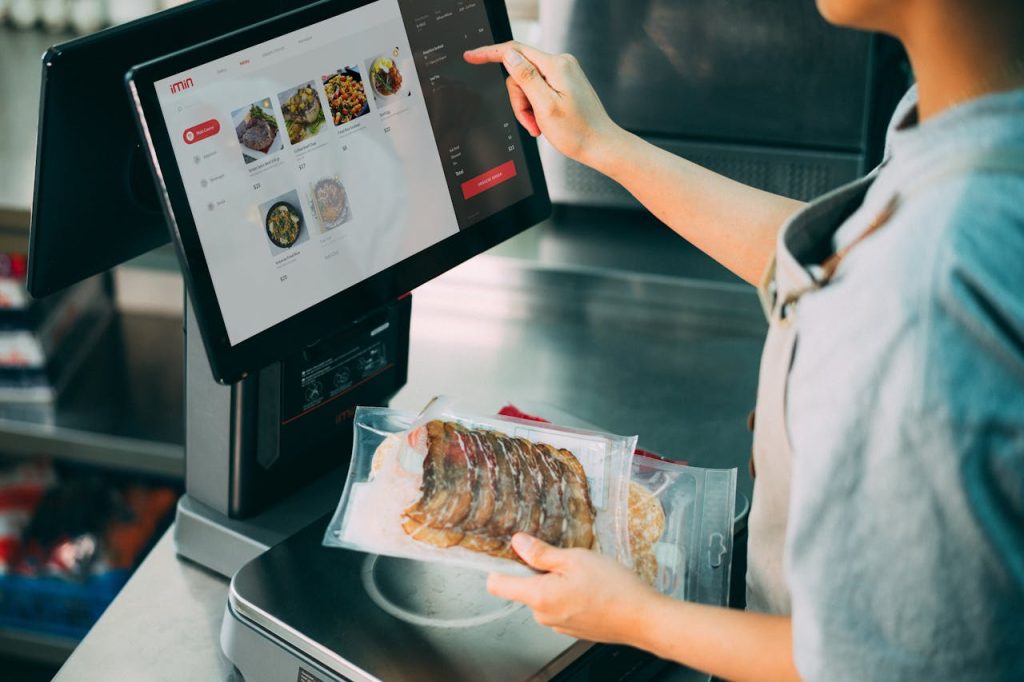
If you’re running a dine-in restaurant—or planning to open one—you need a POS system that can handle fast-paced service, coordinate your staff, and keep your operations tight. The right setup can save time, reduce errors, and make day-to-day tasks easier for your team.
POS systems for dine-in restaurants are built around two main areas: frontend and backend.
The frontend covers everything customer-facing or used by your floor staff—terminals, kiosks, or devices used to punch in orders.
The backend supports the kitchen and behind-the-scenes operations like order routing, printing, and scanning. Both parts work together to move orders efficiently from table to kitchen to payment.
What follows is a breakdown of these two areas—starting with the frontend—so you can better understand what to look for and where you should invest first.
Here is the hardware we will cover in this article:
POSRG can help with your POS setup
The right hardware, expert installation, and reliable support — all from one team.
Talk to a POS Expert Todayi. Affordable Frontend POS Systems
The frontend includes all the hardware your team uses to interact with customers, input orders, and manage payments. It sits in key service points—like at the bar, in server stations, or near the kitchen—and drives the order-taking process.
You’ll find two main categories of hardware in the frontend:
- All-in-one terminals: Used by staff to enter orders and manage the transaction process
- Kiosks: Self-serve units where customers can order directly
Here are some great affordable options for the frontend.
1. All‑in‑One Terminals
1A. Toshiba TCx 820
The Toshiba TCx 820 is a sleek, high‑performance all‑in‑one terminal that fits on your countertop and manages orders, payments and peripheral connections in a single unit. It handles heavy restaurant traffic and integrates easily with kitchen systems.
| Specification | Value |
| Screen | PCAP multi‑touch, up to 23.8″ |
| Processor | 13th‑gen Intel (multiple options) |
| Memory / Storage | Up to 64 GB DDR5 RAM, 512 GB SSD |
| I/O Ports | USB‑C, USB‑3, powered USB, Ethernet, serial options |
| Dust/Water Rating | Retail‑hardened, built to IP53 standard |
Why we recommend it: It combines top-tier processor speed, rugged build and flexible I/O ports to support demanding service environments and ensure durability for years.
1B. Partner Tech Audrey II
The Audrey II is an Android‑based all‑in‑one terminal featuring a large, high‑brightness display and thin bezel design. It provides smooth touchscreen performance and extensive peripheral support for table service and kiosk-style ordering.
| Specification | Value |
| Display | 15.6″ Full HD, anti‑glare, on‑cell PCAP (up to 400 nits) |
| Processor | Intel Tiger Lake (Core i3/i5/i7) or Elkhart Lake Celeron |
| Memory / Storage | DDR4 up to 32 GB; SSD up to 512 GB PCIe M.2 |
| OS Options | Android 13 or Windows 10/11, Linux Ubuntu |
| Environmental Rating | Front panel IP65; full unit IP54 |
Why we recommend it: Its bright full HD screen, scalable memory and storage, plus rugged environmental ratings make it ideal for crowded dining areas and self‑serve options.
1C. HP Engage One Pro (as a terminal)
The HP Engage One Pro is a robust all‑in‑one terminal combining compute, display and stand in a compact unit. It handles full dine‑in workloads and supports multimedia customer-facing features like promotions and digital signage.
| Specification | Value |
| Processor | Intel Core i5 / i7 (up to 10th gen) |
| Memory / Storage | Usually 16 GB DDR4, SSD 256 GB or higher |
| Display | 15.6″ touchscreen (Full HD or UWVA) |
| Graphics | Intel UHD integrated graphics |
| Weight | Approx. 3.4 kg |
Why we recommend it: Combines reliable Intel compute, ample memory and integrated signage capability in a clean, compact form ideal for front-of-house POS terminals.
1D. Elo I Series 5 (as a terminal)
The Elo I Series 5 is an Android-based POS terminal in various sizes (10″, 15.6″, 21.5″), built for flexibility across ordering stations and queue lines. It’s silent, fanless and durable enough for restaurant environments.
| Specification | Value |
| Display Options | 10″, 15.6″ or 21.5″ Full HD touchscreen |
| Processor | Qualcomm Snapdragon QCS6490 |
| Memory / Storage | 8 GB RAM, 64 GB SSD (typical) |
| Connectivity | Wi‑Fi 6E, optional PoE, edge‑connect ports |
| Operating System | Android 14 with Google Play support |
Why we recommend it: It offers flexible screen sizes, reliable Android performance, and enterprise-grade support—ideal for self-ordering or staff ordering promptly.
1E. NCR 8 (NCR Real POS CX8)
The NCR 8 terminal, part of the RealPOS CX8 family, is a compact, modular POS system praised for its tool‑free serviceability and upgrade flexibility. It meets high longevity needs and adapts to evolving restaurant settings.
| Specification | Value |
| Processor | Intel 9th‑gen Core (i3/i5/i7 options) |
| Memory / Storage | SSD options: SATA/NVMe, RAID support |
| I/O Ports | USB powered/serial/USB‑C, DisplayPort options |
| Maintenance | Tool‑free access to memory, drives, motherboards |
| Footprint | Up to 50% smaller than traditional modular systems |
Why we recommend it: Its modular build and front-access design make repairs and upgrades fast and easy, reducing downtime in high-volume dine‑in settings.
ii. Affordable Backend POS Systems
The backend is the engine room of your dine-in restaurant’s POS system. While the frontend handles customer interaction, the backend keeps your kitchen running smoothly and ensures orders are processed accurately and on time.
A solid backend setup helps staff communicate across the floor and kitchen, minimizes delays, and supports high output without confusion..
The backend typically includes:
- Kitchen Display Systems (KDS) to route and organize incoming orders in real time
- Kitchen printers for hard-copy tickets in heat-intensive environments
- Label printers for takeout and packaging accuracy
- Barcode scanners to speed up order lookups, loyalty program redemptions, and inventory tracking
- Receipt printers to generate customer bills and kitchen duplicates when needed
These systems need to be fast, durable, and built to withstand heat, moisture, and constant use. Most operate behind the scenes but play a central role in keeping your staff focused and your guests satisfied.
Next, we’ll look at the exact products that deliver on that reliability.
1. Kitchen Display System (KDS) – Elo I Series 4
A Kitchen Display System routes orders from your POS seamlessly to the kitchen, replacing paper tickets. With the Elo I Series 4, you have a durable touchscreen that displays live orders and prep statuses. It helps staff coordinate timing and reduces miscommunication in a busy kitchen environment.
| Specification | Details |
| Screen Sizes | 10″, 15.6″, or 21.5″ Full HD |
| Touch Technology | 10‑point capacitive PCAP |
| Processor | Qualcomm Snapdragon SDA660 or Rockchip RK3399 |
| Memory / Storage | 4 GB RAM, 32–64 GB Flash |
| Operating System | Android 10 with EloView support |
| Connectivity | Wi‑Fi, Bluetooth 5.0, Ethernet |
| Mounting Options | Counter, wall, pole, VESA mounts |
| Weight | Approx. 2–3 kg |
Why we recommend it: Offers clear order visibility, durable touch input, and flexible mounting for kitchen use, keeping food service precise and timely.
2. Kitchen Printer – Epson TM‑U220B
The TM‑U220B impact printer handles kitchen order tickets reliably, even in hot and humid environments. Impact printing resists grease and heat. Two-color output helps identify special requests or allergy notes easily.
| Specification | Details |
| Print Method | 9‑pin serial dot‑matrix |
| Print Speed | Up to 6 lines per second |
| Paper Width | Supports 58 mm, 70 mm, 76 mm rolls |
| Colour | Two‑colour (black/red) |
| Dimensions (W×D×H) | ~160 × 248 × 139 mm |
| Weight | ~2.5 kg |
| Interfaces | Serial, Ethernet, USB |
| Cutter | Auto‑cutter available |
| Reliability | ~18 million lines, ~800 000 cutter cycles |
Why we recommend it: Delivers durable, high-speed kitchen printing with clear visual differentiation and long lifespan under harsh kitchen conditions.
3. Receipt Printers
3A. Epson TM-T88 Receipt Printer
The Epson TM‑T88 series has built a reputation for fast, reliable receipt printing across restaurants and retail. It uses thermal printing for quick, quiet receipts at the checkout that customers receive.
| Specification | Details |
| Print Method | Thermal line printing |
| Speed | Up to ~300 mm/s |
| Interfaces | USB, Ethernet, Serial, Powered USB |
| Paper Roll Size | 80 mm (or 58 mm with adapter) |
| Print Resolution | High‑quality graphics and text |
| Reliability | ~70 million lines mean-time-between-failures |
| Features | Drop‑in loading, auto cutter |
Why we recommend it: Fast, consistent checkout performance and flexible connectivity make it ideal for high-volume dine‑in billing.
3B. Epson TM-T88VII Receipt Printer
The TM‑T88VII is the latest model in Epson’s flagship receipt line. It prints at lightning-fast 500 mm/s, supports Wi‑Fi, Ethernet, USB and mobile devices, and includes paper-saving and remote web-print features.
| Specification | Details |
| Print Speed | Up to 500 mm/s |
| Interfaces | USB, Ethernet, Serial, Powered USB, Wi‑Fi |
| Print Resolution | Sharp text and barcode output |
| Features | Auto cutter, server direct print, WPA3 security |
| Connectivity | Simultaneous PC, mobile and web printing |
| Warranty | 4‑year limited warranty |
Why we recommend it: Its exceptional speed and modern connectivity reduce checkout queues and support cloud or web ordering workflows.
4. Label Printer – Epson TML90
For takeout orders and labeling, the TML90 prints receipts and labels with barcodes, pricing, or order info. Thermal printing and drop-in paper loading simplify operation under rush.
| Specification | Details |
| Print Method | Thermal line |
| Speed | Up to 150 mm/s |
| Resolution | 203 dpi for text, logos and barcodes |
| Paper Width | Adjusts from 38 mm to 80 mm |
| Interfaces | USB, Serial, Parallel, Ethernet, Bluetooth |
| Roll Capacity | Up to 90 mm diameter |
| Reliability | 70 million lines MTBF, 2 million cutter cycles |
| Mounting Options | Counter, vertical wall, peeler model available |
Why we recommend it: Combines high print quality, flexible media sizes and reliable performance for accurate packaging and takeout labeling.
5. Barcode Scanner– Zebra DS9308
A fast presentation-style scanner, the Zebra DS9308 reads 1D or 2D barcodes from receipts, loyalty cards or kitchen tickets. It supports hands-free scanning and stays accurate despite glare or low contrast.
| Specification | Details |
| Scanner Type | 2D imager, presentation desktop |
| Scan Speed | Up to ~3050 mm/sec |
| Sensor Resolution | ~1280×800 pixels |
| Field of View | ~52° horizontal × 33° vertical |
| Weight | ~318–417 g |
| Dimensions (W×D×H) | ~8.6 × 8.3 × 14.5 cm |
| Illumination | 660 nm Hyper Red LED |
| Readability | Scans glossy or low-contrast codes |
Why we recommend it: Delivers fast, accurate scanning across loyalty, order tracking or inventory tasks with a hands-free design that reduces staff effort and improves accuracy.
How Much Does a Dine-In Restaurant POS System Cost?
POS system costs vary depending on how many stations you need, what hardware you choose, and whether you’re adding kitchen displays or self-service kiosks. Here’s a general pricing range based on typical dine-in setups:
- Single lane (1 terminal with peripherals): $3,000 – $5,000
- Full dine-in setup (2 terminals): $6,000 – $10,000
- Add-on Kitchen Display System (KDS): $3,000 – $5,000
- Kiosk setups: Cost varies depending on model and mounting but often reuses all-in-one hardware
- Peripherals (label printers, scanners, drawers): Usually priced individually or bundled with terminals
If you’re expanding, switching ownership, or retrofitting an old system, final cost depends on what you already have and what condition it’s in.
Don’t Go For the Cheapest Option – It Costs More in the Long Run
Cheap terminals and printers often fail under the demands of a full-service kitchen or busy front-of-house. When hardware breaks down, you’re not just losing time—you’re losing orders and customer confidence.
Repairs take time and warranties may be limited or non-existent. You end up replacing gear sooner than expected, which adds to the total spend. Invest once in something reliable, and it’ll keep working shift after shift with minimal interruption.
Want a High Quality and Cheap Option? Try a Refurb
Refurbished POS hardware is a smart way to cut cost without sacrificing performance. Many of the systems we carry, like older Toshiba TCx models or Elo terminals, are available in certified refurbished condition.
You still get enterprise-grade quality and serviceable parts—but at a fraction of the cost of new units. If your budget is tight, this is one of the best ways to stretch your dollars and still build a durable setup.
We Specialize in POS Solutions – Let Us Help Your Business
We work with restaurant owners every day to build durable, affordable systems that match how you run your business. POSRG is based in Burlington and serves businesses across Canada. Contact us today and we’ll help you get set up with hardware that works—without the guesswork.
Contact Us Today